

Logic mind maps
Spiriom
A map that thinks.
Bubbles, conditions, loops — and a procedure that unfolds step by step. Spiriom turns a mind map into a run you can follow, present and archive.
- Available
- No account
- Offline
- 4 languages
- Free
In pictures
Scroll to see the other screens.
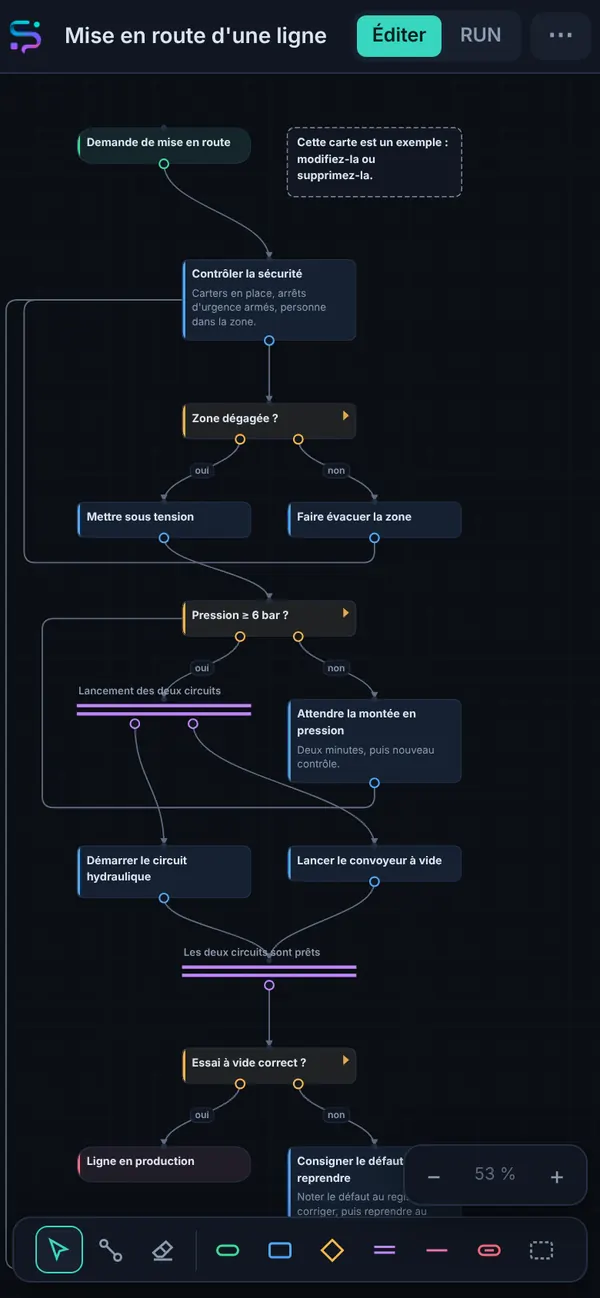
A map: conditions, a loop and parallel branches 
The run begins 
A condition: you answer, the path lights up
The essentials
Grafcet, without the formalism
A bubble asks a question and branches out to as many answers as needed. An arrow can go back up: that’s a loop, not a mistake. Two branches can set off together and meet again further on. Each bubble’s type says what its outputs do: nothing is ambiguous anymore.
Write it, then run it
RUN mode moves a token forward: you answer, the path lights up and gets a timestamp, a mini-map shows where you are, and every run becomes a log you can look back at. Presentation mode keeps only the message and the buttons — the view to hold in your hand in front of the machine.
What it can do
Seven bubble types
Start, step, condition, AND, OR, end, note.
Step-by-step runs
A token that moves forward, a mini-map to find your way.
Timestamped logs
Every run is archived, answer by answer.
Presentation mode
Full screen, big buttons, nothing else.
AI-readable
The map copies as text along with a description of the format: have it reworked, paste it back.
Image export
Share the map just as it is.
Fact sheet
- Type
- Tool · maps and procedures
- Devices
- Phone, tablet, computer (browser), installable
- Languages
- French, English, Spanish, German
- Account
- None
- Offline
- Yes
- Ads
- None
- Purchases
- None
- Price
- Free
- Status
- Available
Your data
- Your maps and your logs are saved in your device’s browser.
- No outside resources: no fonts, no libraries, no server.
- Exports are files that you keep.
Install it
Open Spiriom, then: on Android, ⋮ menu → “Install app”; on iPhone, Share → “Add to Home Screen”; on a computer, the install icon in the address bar.